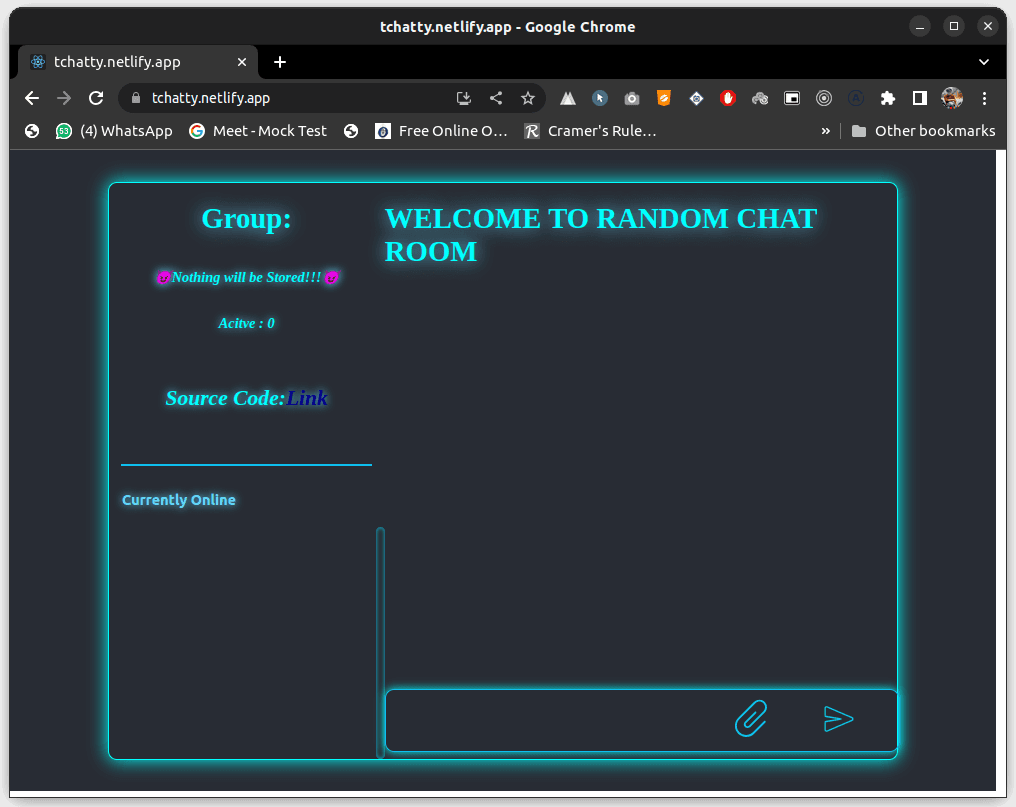
Building a Simple Chat App with Socket.IO and Node.js
In this tutorial, we'll build a basic chat application using Socket.IO and Node.js. Socket.IO is a powerful library that enables real-time, bidirectional communication between web clients and servers. By the end of this tutorial, you'll have a functional chat app where users can join rooms and exchange messages in real-time.
Prerequisites
- Basic understanding of JavaScript and Node.js. - Node.js and npm installed on your system.
Setting Up the Project
1. Create a new directory for your project and navigate to it in your terminal.
2. Initialize a new Node.js project by running:
npm init -y1 Install the required dependencies:
npm install express socket.ioCreating the Server
- Create a file named
server.jsin your project directory. - Add the following code
import express from "express";
import { createServer } from "http";
import { Server } from "socket.io";
const PORT =process.env.PORT|| 9000;
const app = express();
const httpServer = createServer(app);
const io = new Server(httpServer, {
  maxHttpBufferSize:1e8,
    cors:{
        origin:"*",
    }
});

httpServer.listen(PORT,()=>{
    console.log(`Server is Running on port : ${PORT}`)
});
Congratulation! you have sucessfully created a nodejs server.now follow the next step
3. Initialize or listen the connection for message communication
io.on("connection", (socket) => {
 console.log("User is connected : "+socket.id);

}
This will print the socket id to the console whenever a new user is connected to your application.
4. After this we will setup frontend and later we will add the remaining code to the server. You just follow the step.
Creating the Client(Frontend)
We are going to create a react app using Vite.To create react app using vite follow the step
1) Copy and paste the command in terminal
yarn create vite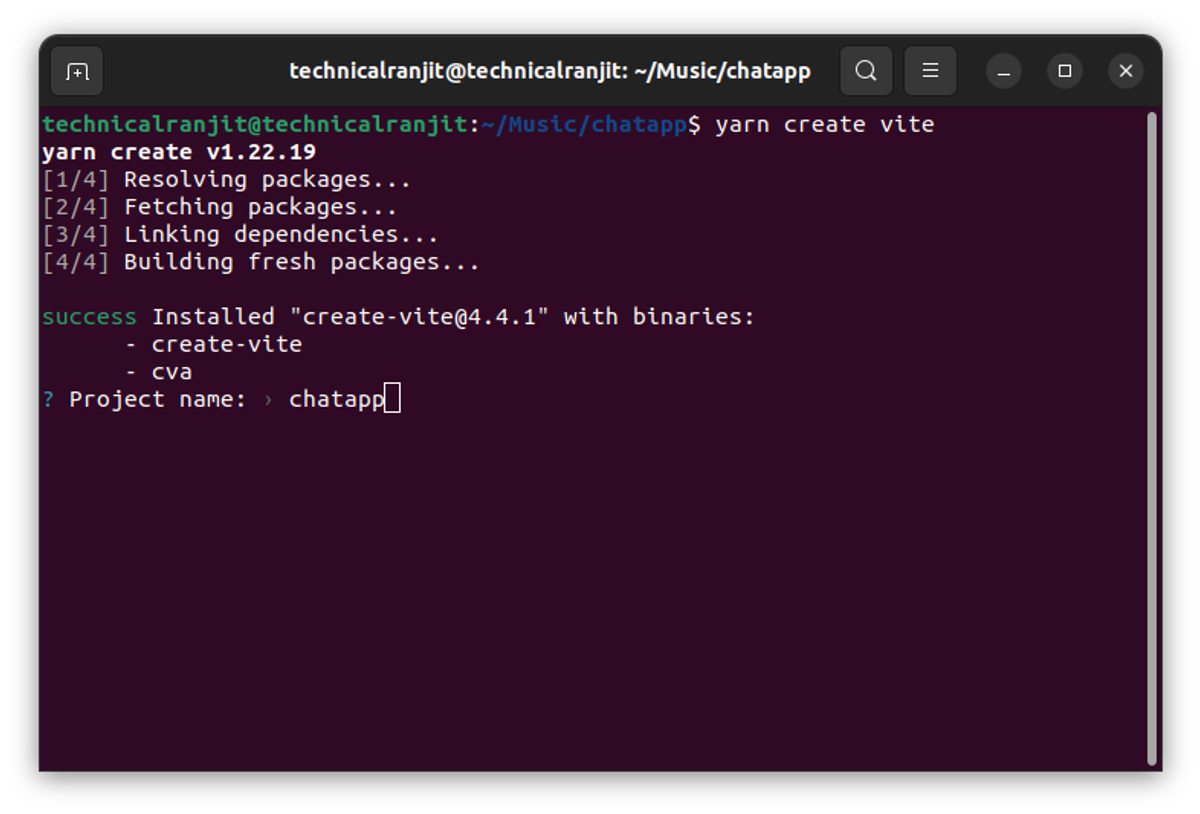
Give your project name here. and press enter after this select React and press enter.
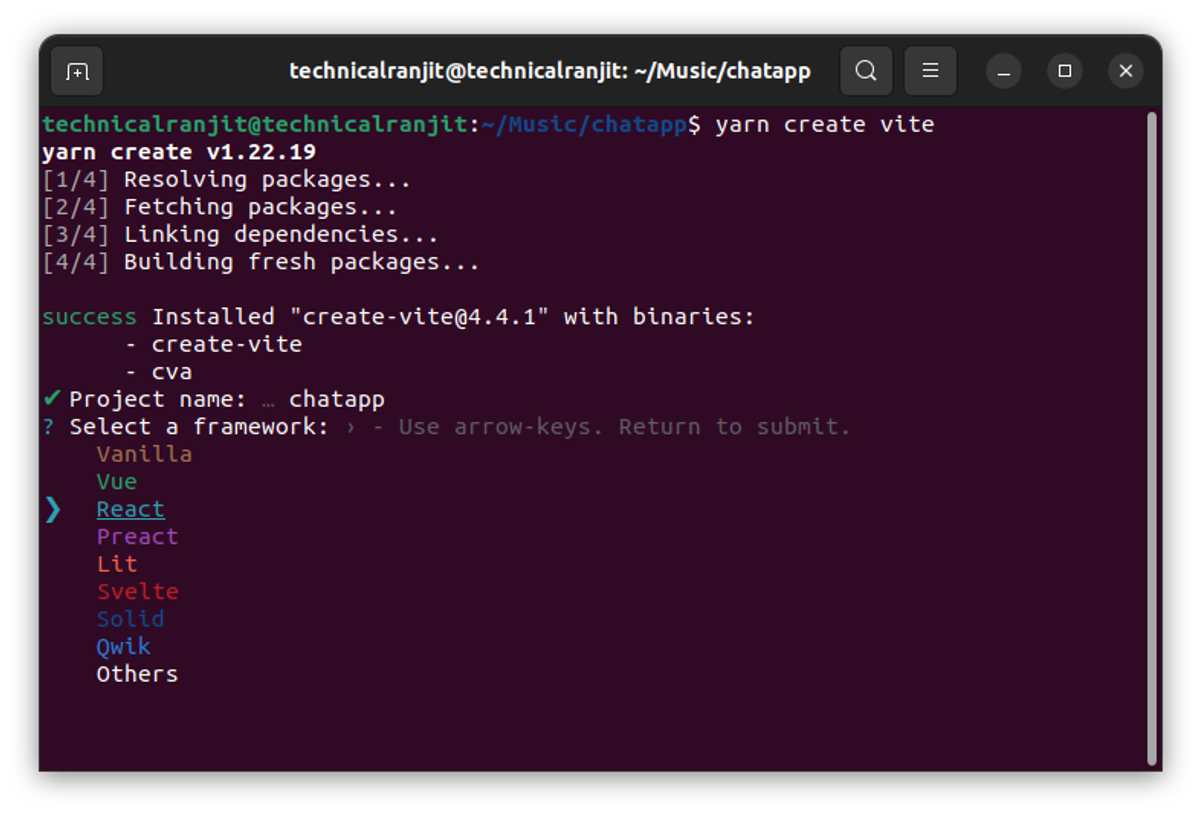
Now select Typescrpt or javascript based on your choice in this tutorial i am going to select javascript because many of you didnot know typescript and hit enter
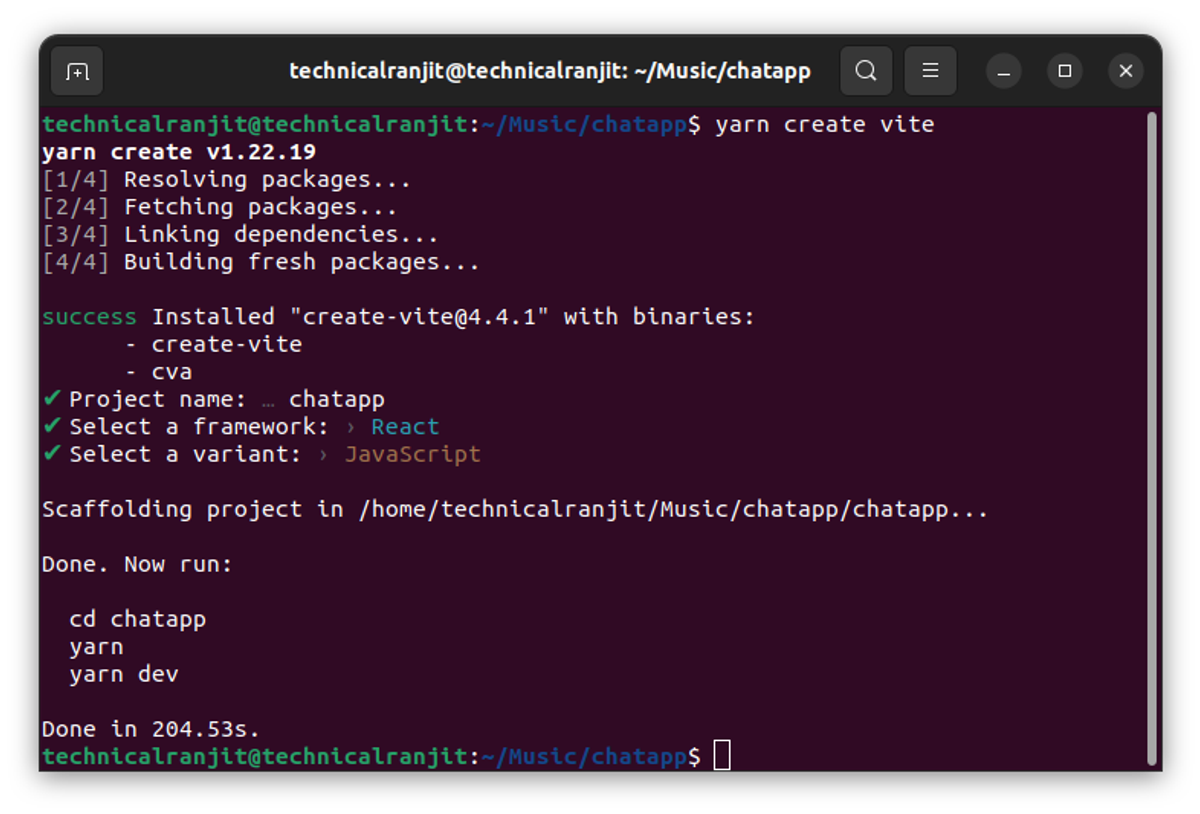
Congrats! You have sucessfully setup your react project.
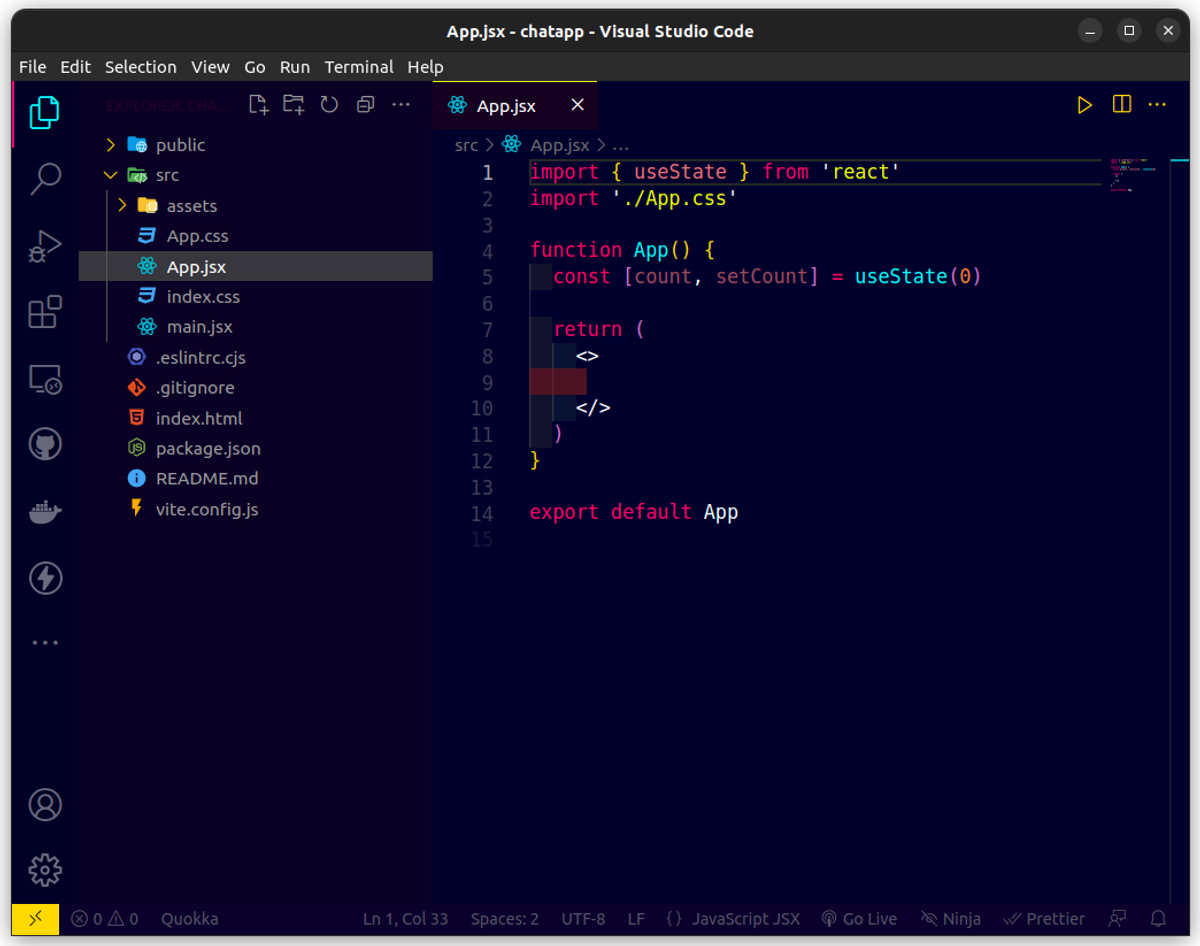
2. Open your app in vscode and go to src directory and remove all the existing code inside App.jsx file
Install the required dependencies:
npm install socket.io-client react-scroll-to-bottom3. Create the main frontent ui.Here you can create your own ui but if you want to use the same ui as i have create just follow and copy the code below.
Create a components follder inside src directory
- Create a Main.js file inside components folder and paste the code
import React, { useState } from "react";

const MainTemp = ({
  onclick,
  username,
  onuserchange,
  room,
  onroomchange,
}) => {


  return (
    <>
      <div className="container_main">
        <div className="subcontainer_main">
            <div className="wrap_main">
                <div className="heading_main">
                    <h1>WELCOME TO RANDOM CHAT ROOM</h1>
                </div>
                <form onSubmit={onclick} className="content_main_cnt">
                    <div className="sub_content_main_cnt">
                    <div className="input_main_cnt">
                    <input onChange={onuserchange} value={username} type="text" name="username" placeholder="Enter Username" required/>
                    </div>
                    <div className="input_main_cnt">
                        {/* <input onChange={onroomchange} value={room} type="text" placeholder="Group Name" /> */}
                        <select value={room} onChange={onroomchange} name="roomSelect" className="selectRoom">
                          <option value="Fun">FUN</option>
                          <option value="Coding">CODING</option>
                          <option value="Random">RANDOM</option>
                        </select>

                    </div>
                    <div className="btn_form_maim">
                        <button type="submit">JOIN</button>
                    </div>
                    </div>

                </form>
            </div>

        </div>
      </div>
    </>
  );
};

export default MainTemp;
Here basically we are creating a form which accepts Your username and that selects the room name from option.
- onclick->will be fired when the form is submitted.
- username->Accepts your username
- onuserchange->Update the username value whenever its changed
- room->Holds the current room Name
- onroomchange->Update the room Name whenever its changes
These are the props used here and i have described it properly.
- Go to App.css and paste the below css code over there
.App {
  text-align: center;
}

.App-logo {
  height: 40vmin;
  pointer-events: none;
}

@media (prefers-reduced-motion: no-preference) {
  .App-logo {
    animation: App-logo-spin infinite 20s linear;
  }
}

.App-header {
  background-color: #282c34;
  min-height: 100vh;
  display: flex;
  flex-direction: column;
  align-items: center;
  justify-content: center;
  font-size: calc(10px + 2vmin);
  color: white;
}

.App-link {
  color: #61dafb;
}

@keyframes App-logo-spin {
  from {
    transform: rotate(0deg);
  }
  to {
    transform: rotate(360deg);
  }
}

::-webkit-scrollbar {
  width: 10px;
}

/* Track */
::-webkit-scrollbar-track {
  box-shadow: inset 0 0 5px #0abeef;
  border-radius: 10px;
}

/* Handle */
::-webkit-scrollbar-thumb {
  background: cyan;
  border-radius: 10px;
}

/* Handle on hover */
::-webkit-scrollbar-thumb:hover {
  background: transparent;
}

.container {
  width: 99%;
  height: 99vh;
  background: #282c34;
  display: flex;
  justify-content: center;
  overflow-y: hidden;
  top: 0;
  position: absolute;
  overflow-x: hidden;
}
.form_group {
  background: #282c34;
  width: 80%;
  height: 90%;
  /* background: red; */
  position: absolute;
  top: 5%;
  justify-content: center;
  display: flex;
  flex-direction: row;
  /* background-color: darkcyan; */
  border-radius: 10px;
  border: 2px solid cyan;
  /* box-shadow: 0 0 20px #ececec; */
  box-shadow: 0 0 20px cyan;
  flex-wrap: wrap;
}

.sidebar {
  content: "";
  border-radius: 10px;
  /* background: red; */
  height: 100%;
  flex-basis: 35%;
  width: 100%;
}
.main_content {
  /* background: blue; */
  border-radius: 10px;
  flex-basis: 65%;
  width: 100%;
  display: flex;
  /* background: red; */
  flex-direction: column;
  position: relative;
  height: 100%;
  justify-content: center;
}
.main_content_main {
  /* background: blue; */
  border-radius: 10px;
  width: 100%;
  display: flex;
  /* background: red; */
  flex-direction: column;
  position: relative;
  height: 100%;
  justify-content: center;
}
.msgtitle {
  flex-basis: 10%;
  display: flex;
  width: 100%;
  justify-content: center;
  /* background: red; */
}
.fl{
  width: 100%;
  height: 100%;
  display: flex;
  flex-direction: column;

}
.fl span{
  flex-basis: 10%;
  color: cyan;
}

.msgtitle .fl h1 {
  font-family: poppins;
  color: cyan;
  text-shadow: 0 0 20px #61dafb;
  flex-basis: 90%;
}

.form_components {
  width: 100%;
  display: flex;
  flex-direction: row;
  justify-content: flex-end;
  margin-bottom: 5%;
  position: relative;

  justify-content: center;
  /* background: blue; */

  margin-top: 10%;
}

.main_form {
  flex-basis: 80%;

  border-radius: 0 0 10px 0;
  display: block;
  height: 100%;
  flex-direction: column;
}
.form_element {
  flex-basis: 100%;
  display: flex;
  height: 100%;
  flex-direction: column;

  /* top: 50%; */
  justify-content: center;
  position: relative;
  width: 100%;
}

.headin {
  width: 100%;
  background: rgb(77, 77, 171);
  flex: 20%;
  top: 0;

  display: flex;
  justify-content: center;
  border-radius: 0 10px 0 0;
  z-index: 1000;
}

.headin_main {
  /* background: red; */
  width: 100%;
  flex-basis: 20%;
  display: flex;
  flex-direction: column;
  justify-content: center;
}
.headin_main h1 {
  color: white;
  text-shadow: 0 0 30px #282c34;
  text-align: center;

  /* font-size: 2vw; */
  /* font-size: 5vmin; */
}
.form_components input {
  width: 70%;
  padding: 12px 10px;
  border-radius: 10px;
  border: 1px solid #282c34;
  box-shadow: 0 0 20px #626262;
  margin-right: 10px;
  margin-left: 1%;
}

.form_components .btnjoin {
  padding: 10px 15px;
  justify-self: center;
  background: palegoldenrod;
  border-radius: 10px;
  font-family: poppins;
  font-size: 15px;
  border: 1px solid #282c34;
  font-weight: 600;
  cursor: pointer;
  transition: 0.3s;
}
.form_components .btnjoin:hover {
  background: teal;
  color: white;
  border: 1px solid white;
}

.form_components li {
  list-style: none;
  background: #ececec;
  box-shadow: 0 0 10px darkcyan;
  padding: 15px 0;
  border-radius: 10px;
  width: auto;
  padding: 10px 10px;
}
.scroll {
  overflow-y: hidden;
  /* overflow-x: hidden; */
  display: block;

  /* background: red; */
  /* margin-top: 50%; */
  top: 20px;
}
.wrap {
  margin: 20px 0;
  width: 100%;
  display: flex;
  /* background: red; */
  height: 65%;
}

.fc {
  bottom: 0;
  position: absolute;
}

.sp {
  width: 100%;
  height: 100%;
  overflow-x: hidden;
  overflow-y: hidden;
  /* overflow-y: scroll; */
}

/* @media only screen and (min-width: 600px) {

  .form_group{
    width: 80%;
    top: 10%;


  }
  .headin h1{
    font-size: 35px;
  }
} */

/* @media only screen and (min-width: 360px) {
  .form_group{
    width: 85%;
    top: 10%;
    height: 80%;
  }
  .headin h1{
    font-size: px;
  }


}@media only screen and (min-width: 270px) {
  .form_group{
    width: 80%;
    top: 10%;
    height: 80%;
  }

}
@media only screen and (min-width: 768px) {

  .form_group{
    width: 50%;
    height: 80%;
  }

} */

.message {
  /* padding: 2px; */
  min-width: 150px;
  /* width: auto; */
  margin-bottom: 15px;
  background-color: var(--light-color);
  border-radius: 5px;
  justify-self: flex-end;
  background: lightgrey;
  font-family: poppins;
  padding: 1px;
  /* flex: 1 1 2000px; */
}

.message .meta {
  font-size: 15px;
  font-weight: bold;
  color: var(--dark-color-b);
  opacity: 0.7;
  top: 2px;
  padding: 0 4px;
  margin-bottom: 0;
  margin-left: 2px;
}

.message .meta span {
  color: #777;
  text-align: right;
  float: right;
  margin-right: 5px;
  font-size: 10px;
}
#you .message .text {
  color: #777;
  text-align: right;
  float: right;
  margin-right: 5px;
  padding: 0 19px;
  font-size: 16px;
}
#others .message .text {
  color: #777;
  text-align: left;
  /* float: right; */
  margin-right: 5px;
  padding: 0 19px;
  font-size: 16px;
}
#you .message .meta {
  text-align: left;
}

.btnsubmit {
  padding: 10px 15px;
  justify-self: center;
  background: palegoldenrod;
  border-radius: 10px;
  font-family: poppins;
  font-size: 15px;
  border: 1px solid #282c34;
  font-weight: 600;
  cursor: pointer;
  transition: 0.3s;
  margin-right: 1%;
}
.btnsubmit:hover {
  background: teal;
  color: white;
  border: 1px solid white;
}

/* If the screen size is 601px wide or more, set the font-size of <div> to 80px */
@media screen and (min-width: 601px) {
  .headin h1 {
    font-size: 36px;
  }
}

/* If the screen size is 600px wide or less, set the font-size of <div> to 30px */

.main_sidebar {
  /* background: green; */
  display: flex;
  width: 100%;
  height: 100%;
  border-radius: 10px;
  flex-direction: column;
  /* justify-content: space-between; */
}

.main_sidebar .group_info {
  width: 100%;
  height: 100%;
  /* background: blue; */
  border-radius: 10px 0 0 0;
  flex-basis: 50%;
}
.main_sidebar .usersInfo {
  width: 100%;
  height: 100%;
  border-radius: 0 0 0 10px;

  flex-basis: 50%;
  /* display: hidden; */
}

.group_info hr {
  width: 90%;
  background-color: #ccc;
  margin-top: 5%;
}
/* .main_content{
  height: 100%;

} */

.grpmain {
  width: 100%;
  display: flex;
  flex-direction: column;
}

.grpmain .grphead {
  width: 100%;
  display: flex;
  justify-content: center;
}

.grpmain h1 {
  font-family: poppins;
  text-shadow: 0 0 20px #61dafb;
  color: cyan;
}
.grpcnt {
  display: flex;
  width: 100%;
  flex-direction: column;
  justify-content: center;
}
.grpcnt p {
  text-align: center;
  color: aqua;
  font-family: poppins;
  font-weight: 700;
  text-shadow: 0 0 10px #61dafb;
  font-style: italic;
}
.grpcnt h2 {
  text-align: center;
  color: aqua;

  font-family: poppins;
  font-style: italic;
}

.usrmain {
  width: 100%;
  display: flex;
  flex-direction: column;
  height: 100%;
}

.usrmain .usrhead {
  display: flex;
  flex-basis: 10%;
  width: 100%;
  /* background: blue; */
  height: 100%;
  margin-left: 15px;
}
.usrmain .usrhead h4 {
  color: #61dafb;
  text-shadow: 0 0 10px #61dafb;
}
.usrmain .usrcnt {
  height: 100%;
}

/* Message Body Parts */

.main_message {
  content: "";
  height: 100%;
  /* background: red; */
  flex-basis: 90%;
  width: 100%;
}

.message_in {
  display: flex;
  width: 100%;
  flex-direction: column;
  position: relative;

  height: 100%;
}

.message_in .show_messages {
  content: "";
  flex-basis: 85%;
}

.message_in .btn {
  flex-basis: 13%;
  height: 100%;
  width: 100%;
  /* position: relative; */
}

.btn .msg_div {
  width: 100%;
  display: block;
  height: 100%;

  /* position: relative; */
}
.btn .msg_div .msgcntdiv {
  width: 100%;
  display: flex;

  border-radius: 0 0 10px 0;
  height: 100%;
  flex-wrap: wrap;
  border: 1px solid #0abeef;
  border-radius: 10px;
  box-shadow: 0 0 10px cyan;
}

.btn .msg_div .msgcntdiv .input {
  flex-basis: 60%;
  width: 100%;
  height: 100%;
}

.btn .msg_div .msgcntdiv .input textarea {
  width: 100%;
  height: 90%;
  background: transparent;
  border: none;

  font-size: 19px;

  padding-left: 10px;
  line-height: 1.5;
  display: inline-block;
  resize: none;
  max-lines: 3;
  overflow-y: hidden;
  color: cyan;
  /* text-decoration: none; */
  text-decoration: none;
  font-family: poppins;
  text-shadow: 0 0 10px #0abeef;
}

.btn .msg_div .msgcntdiv .input textarea:focus {
  border: none;
  outline: none;
}

.btn .msg_div .msgcntdiv .attachment {
  flex-basis: 40%;
  display: flex;
  flex-direction: row;

  justify-content: center;
  width: 100%;
  text-align: center;
  /* background: #61dafb; */
  height: 100%;
  justify-content: space-evenly;
}

.at1 {
  width: 50px;
  fill: hsl(193, 93%, 50%);
  /* background: red; */
  display: flex;
  padding: 5px;
  cursor: pointer;
  justify-content: center;
  flex-direction: column;
}
.at1 button {
  width: 100%;
  background: transparent;
  border: none;
  cursor: pointer;
}.at1 label {
  width: 100%;
  background: transparent;
  border: none;
  cursor: pointer;
  transition: 0.2s;
}
#imginput{
  position: absolute;
  opacity: 0;
  z-index: -1;
  width: 100%;
}
.show_messages {
  /* background: red; */
  width: 100%;
  height: 100%;
  display: block;
  position: relative;
}
.show_messages .messagecontainer {
  content: "";
  width: 100%;
  /* background: cyan; */
  height: 98%;
  display: flex;
  flex-direction: column;
  /* overflow-y: scroll; */
  position: absolute;
}
.msgg {
  width: 100%;
  display: flex;
  flex-direction: row;
  margin-bottom: 10px;
  /* justify-content: flex-end; */
}
.msgboxmain {
  width: 250px;
  /* background: red; */
  display: flex;
  flex-direction: column;
text-overflow: clip;
  margin-left: 10px;
  /* margin-top: 10px; */
  border: 2px solid #0abeef;
  box-shadow: 0 0 20px #0abeef;
  border-radius: 10px;
  overflow-wrap: break-word;
}

.msgboxhead {
  width: 100%;
  display: flex;
  justify-content: space-between;
  overflow-wrap: break-word;
}

.msgboxhead p {
  color: cyan;
  text-shadow: 0 0 10px cyan;
  margin: 0 15px;
  margin-top: 2px;
  font-family: poppins;
  font-weight: 700;

}
.msgboxcnt {
  width: 100%;
  display: flex;
  word-wrap    : break-word;
  overflow-wrap: break-word;
 overflow: auto;
 height: 98%;
 margin-top: 2%;
}
.ptime {
  font-size: 12px;
}
.msgboxcnt p {
  color: cyan;
  text-shadow: 0 0 10px cyan;
  padding: 0 5px;
  text-overflow: clip;


}
.msgboxcnt div{
  width: 100%;
  display: flex;
  flex-direction: column;
  /* border-radius: 10px; */

}
.msgboxcnt div img{
  border-radius: 0 0 0 0;
}
.msgboxcnt img {
 width: 100%;
 height: 100%;
 border-radius:0 0 10px 10px;


}
.ld{
  position: absolute;
  bottom: 0;
  z-index: 1000;
  width: 100%;
  background: red;
}
.usrcnt {
  content: "";

  flex-basis: 90%;
  height: 100%;
  width: 100%;

  position: relative;
}
.scrollingdiv {
  width: 100%;
  height: 100%;
  position: relative;
  overflow-y: scroll;
  display: flex;
  flex-direction: column;
  position: absolute;
}
.cntusrmain {
  width: 98%;
  display: flex;
  border: 1px solid #0abeef;
  justify-content: space-between;
  margin-left: 1%;
  margin-bottom: 10px;
  box-shadow: 0 0 5px #0abeef;
}
.cntusrmain .users {
  font-family: poppins;
  padding-left: 15px;
  color: cyan;
  text-shadow: 0 0 10px #0abeef;
  font-size: 10px;
}
.cntusrmain .logoonline {
  font-family: poppins;
  padding-right: 25px;
  color: cyan;
  text-shadow: 0 0 10px #0abeef;
  font-size: 10px;
}

#you {
  justify-content: flex-end;
}
#others {
  justify-content: flex-start;
}

#you .cntusrmain {
  margin-right: 2%;
}
#others .cntusrmain {
  margin-left: 2%;
}

/* Designing Main Page */

.container_main {
  background: #282c34;
  content: "";

  width: 100%;
  height: 100vh;
  display: flex;
  justify-content: center;
}

.subcontainer_main {
  width: 90%;
  height: 80%;
  content: "";
  border: 2px solid #0abeef;
  box-shadow: 0 0 20px cyan;
  top: 10%;
  position: absolute;
}
.subcontainer_main .wrap_main {
  width: 100%;
  height: 100%;
  display: flex;
  flex-direction: column;
}

.subcontainer_main .wrap_main .heading_main {
  flex-basis: 20%;
  width: 100%;
  height: 100%;
  display: flex;
  justify-content: center;
}
.subcontainer_main .wrap_main .heading_main h1 {
  text-align: center;
  color: cyan;
  text-shadow: 0 0 30px #0abeef;
  font-family: poppins;
  font-weight: 900;
  font-style: italic;

}
.subcontainer_main .wrap_main .content_main_cnt {
  flex-basis: 80%;

  display: flex;
  flex-direction: row;
  justify-content: center;
  width: 100%;
  height: 100%;
  position: relative;
}
.sub_content_main_cnt {
  width: 90%;
  /* background: olive; */
  display: flex;
  flex-direction: column;
  /* position: relative; */
  justify-content: center;
  height: 100%;

  /* justify-content: center; */
}

.input_main_cnt {
  margin-bottom: 10%;
  display: flex;
  width: 100%;

  justify-content: center;
}

.input_main_cnt input {
  padding: 10px 0;
  width: 90%;
  border-radius: 10px;
  background: transparent;
  border: 1px solid #0abeef;
  box-shadow: 0 0 10px cyan;
  color: cyan;
  text-decoration: none;
  text-shadow: 0 0 10px cyan;
  padding-left: 10px;
  font-family: poppins;
  font-size: 19px;
}
.input_main_cnt input:focus {
  border: none;
  outline: none;
  border: 2px solid cyan;
}
.input_main_cnt input:hover {
  box-shadow: 0 0 50px cyan;
}
.btn_form_maim {
  justify-content: center;
  display: flex;
  width: 100%;
}
.btn_form_maim button {
  width: 150px;
  padding: 10px 0;
  background: transparent;
  border: 1px solid cyan;
  color: cyan;
  font-family: poppins;
  font-size: 17px;
  border-radius: 5px;
  cursor: pointer;
  letter-spacing: 0.4em;
  font-weight: 900;

}
.btn_form_maim button:hover {
  /* background: #777; */
  transition: 0.3s;
  box-shadow: 0 0 50px cyan;
  color: cyan;
  text-shadow: 0 0 10px cyan;
}

.selectRoom{

    padding: 10px 0;
    width: 90%;
    border-radius: 10px;
    background: transparent;
    border: 1px solid #0abeef;
    box-shadow: 0 0 10px cyan;
    color: cyan;
    text-decoration: none;
    text-shadow: 0 0 10px cyan;
    padding-left: 10px;
    font-family: poppins;
    font-size: 19px;
    cursor: pointer;

}
.selectRoom option{
  background:#282c34;
  color: cyan;
  outline: none;
  cursor: pointer;


}.selectRoom:hover{
  background:#282c34;
  color: cyan;
  cursor: pointer;
  box-shadow: 0 0 50px cyan;

}
.grpcnt h2 p a {
  text-decoration: none;
  color: darkblue;
  cursor: pointer;
}

/*
.spanuser{
  width: 100%;
  display: flex;
  flex-direction: row;
} */
#your{


  /* background: red; */
  justify-content: flex-end;
}
#othe{

  /* background: blue; */
  justify-content: flex-start;
}
.spanuser{
  width: 100%;
  display: flex;
  justify-content: center;
  flex-direction: column;
}

.main_cnt_preview{
  width: 100%;
  height: 100%;
  /* background: red; */
  position: fixed;
  top: 0;
  left: 0;
  /* opacity:0; */
  /* display: flex; */
  justify-content: center;
  flex-direction: row;
  transition: display 1s linear;

  /* transition: 0.6s; */
  display: none;

}

.prev{
  display: block;
  /* opacity: 1; */

}

.sub_cnt_preview{
  width: 79%;
  height: 89%;
  background: #777;
  border-radius: 10px;
  box-shadow: 0 0 20px #0abeef;
  margin-top: 2.5%;
  position: relative;
  left: 10%;
}
.image_preview{
  width: 100%;
  height: 100%;
  border-radius: 10px;
}
.image_preview img{
  width: 100%;
  height: 100%;
  object-fit: contain;
  border-radius: 10px;
}
.cancelBtn{
  position: absolute;
  width: 100%;
  /* background: red; */
  display: flex;
  margin-top: 2%;
  justify-content: flex-end;
}
.cancelBtn button{
  margin-right: 2%;
  width: 50px;
  background: transparent;
  border: 2px solid cyan;
  box-shadow: 0 0 20px #0abeef;
}

.cancelBtn button img{
  width: 100%;
}
@media screen and (max-width: 1920px) {
  .input_main_cnt input {
    width: 60%;
  }.selectRoom {
    width: 62%;
  }
  .subcontainer_main {
    width: 70%;
  }
  .input_main_cnt {
    margin-bottom: 8%;
  }
  .fl span{
    display: none;
  }
}

@media screen and (max-width: 700px) {
  .headin h1 {
    font-size: 35px;
  }
  .sidebar {
    display: hidden;
    flex-basis: 100%;
    height: 50%;
  }
  .main_content {
    flex-basis: 100%;
    height: 100%;
  }
  .form_group {
    width: 95%;
  }
  .sidebar {
    display: none;
  }
  .msgtitle {
    font-size: 10px;
    text-align: center;
  }
  .msgboxmain {
    width: 200px;
  }
  .input_main_cnt input {
    width: 60%;
  }
  .selectRoom {
    width: 63%;
  }
  .subcontainer_main {
    width: 93%;
  }
  .input_main_cnt {
    margin-bottom: 10%;
  }
  .subcontainer_main .wrap_main .heading_main h1 {
    font-size: 25px;
  }
  .subcontainer_main {
    height: 95%;
    top: 0;
  }
  .fl span{
    display: block;
  }

  .sub_cnt_preview{
    width: 94%;
    left: 2.5%;
    height: 89%;
    top: 3.2%;
  }

}
@media screen and (max-width: 350px) {
  .headin h1 {
    font-size: 30px;
  }
  .sidebar {
    display: hidden;
    flex-basis: 100%;
    height: 40%;
  }
  .main_content {
    flex-basis: 100%;
    height: 60%;

    top: 0;
  }
  .btn .msg_div .msgcntdiv .input {
    flex-basis: 50%;
  }
  .btn .msg_div .msgcntdiv .attachment {
    flex-basis: 60%;
  }
  .fl span{
    display: block;
  }

}- Go to Index.css and paste this code
body {
  margin: 0;
  font-family: -apple-system, BlinkMacSystemFont, 'Segoe UI', 'Roboto', 'Oxygen',
    'Ubuntu', 'Cantarell', 'Fira Sans', 'Droid Sans', 'Helvetica Neue',
    sans-serif;
  -webkit-font-smoothing: antialiased;
  -moz-osx-font-smoothing: grayscale;
}

code {
  font-family: source-code-pro, Menlo, Monaco, Consolas, 'Courier New',
    monospace;
}
Initialize Your Socket.io client in App.js File
import "./App.css";
import React, { useEffect, useState } from "react";
const { io } = require("socket.io-client");

const socket = io("http://localhost:8000");
function App() {

  return (
    <>

    </>
  );
}

export default App;
Now Go to App.js and Import Your Main.js components over there which you have created beore.
import "./App.css";
import React, { useEffect, useState } from "react";
import Main from "./assets/Components/Main";

const { io } = require("socket.io-client");

const socket = io("http://localhost:8000");
function App() {


  const [username,setUsername] = useState("");
  const [room,setRoomname] = useState("");


  const onclick = (e) => {

  };


  return (
    <>
      <div className="conatiner">

          <Main
            onclick={onclick}
            value={username}
            username={username}
            onroomchange={(e) => {
              setRoomname(e.target.value);
            }}
            onuserchange={(e) => {
              setUsername(e.target.value);
            }}
            room={room}
          />


      </div>
    </>
  );
}

export default App;
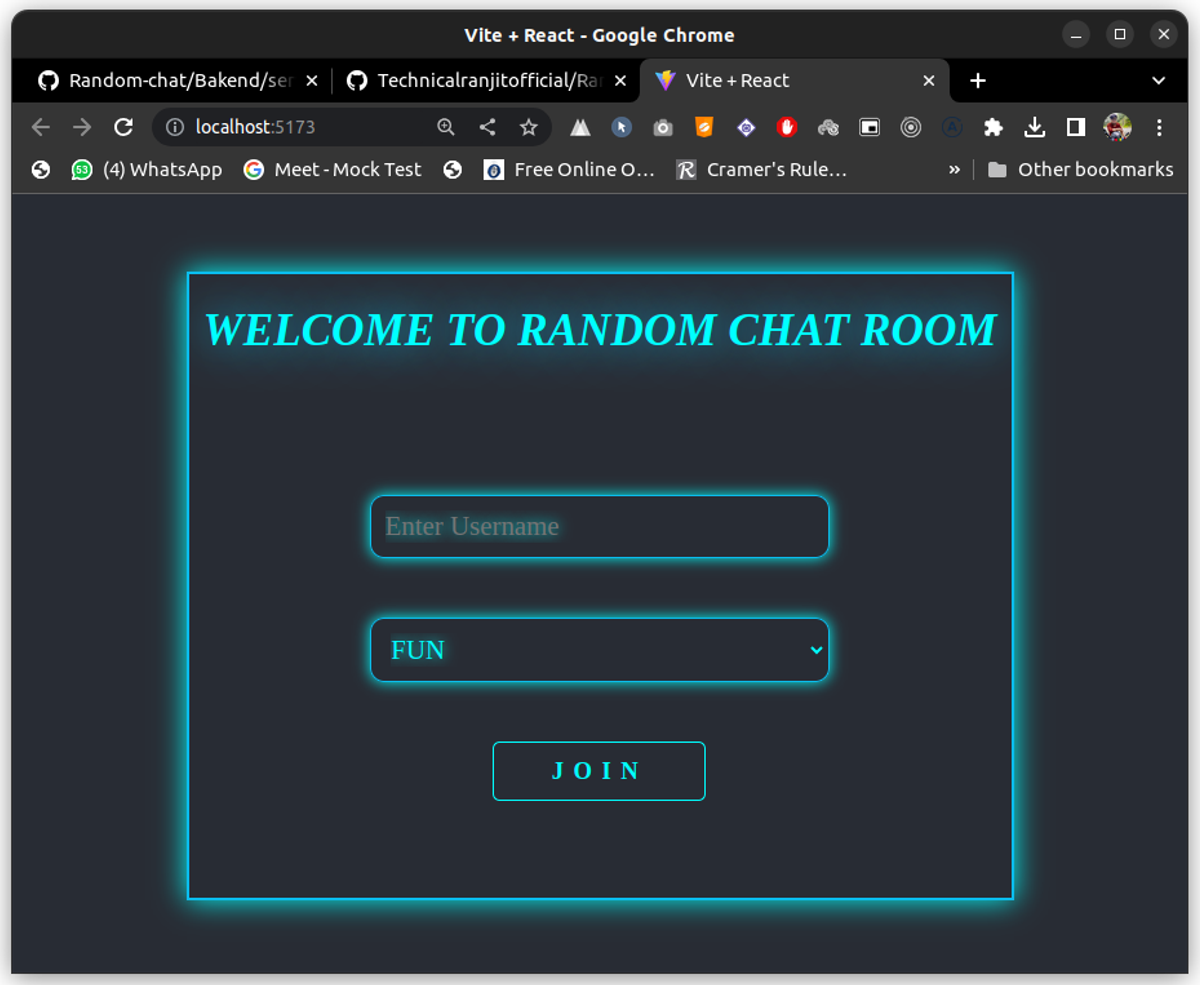
Here Main components is imported and we have passed the props value like username room name and onchange function. After this just run your project using the below command.
npm run devNow your Main Page will look like this
- Write onclick function copy and paste the below function
Now we are going to work with both server and client whenever a user join the chat we are going to emit the join_room using socket.io and emitting the oin_room join_room from client side and getting that response in server side
  const [isMainPage,setIsMainPage] = useState(true);


  const onclick = (e) => {
    const onclick = (e) => {
      e.preventDefault();
      // console.log(username);
      setIsMainPage(false);
      const data = {
        username: username,
        room: room,
        id: socket.id,
        time:
          new Date(Date.now()).getHours() +
          ":" +
          new Date(Date.now()).getMinutes(),
        userType: "new_user",
      };
      socket.emit("join_room", data);
    };

  };
Here isMainPage basically tells that we are in mainpage and whenever a user join the chat or click on join chat it will become false and chatPage will be displayed
- We are creating a data object and for storing username,room,socketId,time at which user joins,Usertype
- and we are emit a function join_room with the data
Lets handle that in server side.
Go to Server.js file and copy and paste the following code
//here we are storing all the users
const users = [];

// Join user to chat
function userJoin(id, username, room) {
  const user = { id, username, room };

  users.push(user);

  return user;
}


// Get room users bascially we are filtering the user using roomname
function getRoomUsers(room) {
  return users.filter(user => user.room === room);
}


Listening the Events from client side
socket.on("join_room",({username,room,time,userType})=>{
  //getting the username,room,time and user type from client

  //Pusing the user to the user array to join the room
   const user = userJoin(socket.id,username,room);
   socket.join(user.room);

  //getting the roomUser from a particular room
   const data = getRoomUsers(room);

  //After getting the toom Users we are emiting to client side
   io.to(user.room).emit("roomUsers",{
    room:user.room,
    users:getRoomUsers(user.room)
   })


  //we are emitting the userdata to room
   const data ={
    username:username,
    room:room,
    id:socket.id,
    message:`${username} has joined the chat`,
    time:time,
    st:st
   }

   io.to(room).emit("new_user",data)


})
Here we have handled the event in server side now after getting the request from client we are again sending back the response to to the client
Two event we have to listen on client side
- roomUsers -> Send the all room user to the room
- new_user -> Send the new user Info to the room
Lets hanlde these two event in client side
Create a Chat.js file in components folder and paste the below code
import React, { useEffect, useState } from "react";
import ScrollToBottom from "react-scroll-to-bottom";
const Chat = ({

  usesrList,
  sendMessage,
  onChange,
  message,
  roomUsers,
  id,
}) => {


  return (
    <>
      <div className="container">
        <div className="form_group">
          <div className="sidebar">
            <div className="main_sidebar">
              <div className="group_info">
                <div className="grpmain">
                  <div className="grphead">
                    <h1>Group: {roomUsers.room}</h1>
                  </div>
                  <div className="grpcnt">
                    <div>
                      <p>😈Nothing will be Stored!!!😈</p>
                    </div>

                    <p>Acitve : 0</p>

                  </div>
                </div>
                <hr color="#0abeef" />
              </div>

              <div className="usersInfo">
                <div className="usrmain">
                  <div className="usrhead">
                    <h4>Currently Online</h4>
                  </div>


                </div>
              </div>
            </div>
          </div>

          <div className="main_content">
            <div className="msgtitle">
              <div className="fl">
                <h1>WELCOME TO RANDOM CHAT ROOM</h1>
                <div className="spanuser">
                  <span>Group : {roomUsers && roomUsers.room} </span>
                </div>
              </div>
            </div>
            <div className="main_message">
              <div className="message_in">
                <div className="show_messages">
                  <div className="messagecontainer">
                    <ScrollToBottom className="sp">
                      {usesrList &&
                        usesrList.map((user) => {
                          return (
                            <div
                              className="msgg "
                              id={id === user.id ? "your" : "othe"}
                            >
                              <div className="msgboxmain">
                                <div className="msgboxhead">
                                  <p>{user.username}</p>
                                  <p className="ptime">{user.time}</p>
                                </div>
                                <div className="msgboxcnt">
                                  { user.message &&  (
                                    <p>
                                      {id === user.id && user.userType === "new_user"
                                        ? "You have Joined The Chat"
                                        : user.message}
                                    </p>
                                  )
                                    }
                                </div>
                              </div>

                            </div>
                          );
                        })}
                    </ScrollToBottom>
                  </div>
                </div>
                <div className="btn">
                  <div className="msg_div">
                    <form
                      onSubmit={sendMessage}
                      id="form"
                      className="msgcntdiv"
                    >
                      <div className="input">
                        <textarea
                          className="sb"
                          spellcheck="false"
                          type="text"
                          message={message}
                          onChange={onChange}
                        />
                      </div>
                    </form>
                  </div>
                </div>
              </div>
            </div>
          </div>
        </div>
      </div>
    </>
  );
};

export default Chat;
- Add Chat Componnets to Main.js file
import "./App.css";
import React, { useEffect, useState } from "react";
import Main from "./assets/Components/Main";
import Chat from "./assets/Components/Chat";

const { io } = require("socket.io-client");

const socket = io("http://localhost:8000");
function App() {


  const [username,setUsername] = useState("");
  const [room,setRoomname] = useState("");

  //checking if we are in MainPage or in chat Page
  const [isMainPage,setIsMainPage] = useState(true);


//storing the message
  const [message,setMessage] = useState("");

  // when Form is submited this function will be fired while joing the room
  const onclick = (e) => {
    const onclick = (e) => {
      e.preventDefault();
      // console.log(username);
      setIsMainPage(false);
      const data = {
        username: username,
        room: room,
        id: socket.id,
        time:
          new Date(Date.now()).getHours() +
          ":" +
          new Date(Date.now()).getMinutes(),
        st: "new_user",
      };
      socket.emit("join_room", data);
    };

  };

  //store the current Users List
  const [usesrList, setUserList] = useState([]);

  //Sending the message we will handle it later
  const sendMessage = async()=>{

  }


  //handle the incoming event from server side and update the Ui
  useEffect(() => {
    //getting the roomUsers eveent which we have emited frin server
    socket.on("roomUsers", ({ users, room }) => {
      const data = {
        users: users,
        room: room,
      };
      setRoomUsers(data);
    });

    //getting the newUsers details
    socket.on("new_user", (data) => {
      setUserList((list) => [...list, data]);

    });
  }, []);


  return (
    <>
      <div className="conatiner">

    {isMainPage?
          <Main
            onclick={onclick}
            value={username}
            username={username}
            onroomchange={(e) => {
              setRoomname(e.target.value);
            }}
            onuserchange={(e) => {
              setUsername(e.target.value);
            }}
            room={room}
          />

          :  <Chat

          usesrList={usesrList}
          message={message}
          onChange={(e) => {
            setMessage(e.target.value);
          }}
          id={socket.id}
          sendMessage={sendMessage}
          roomUsers={roomUsers}
        />}


      </div>
    </>
  );
}

export default App;
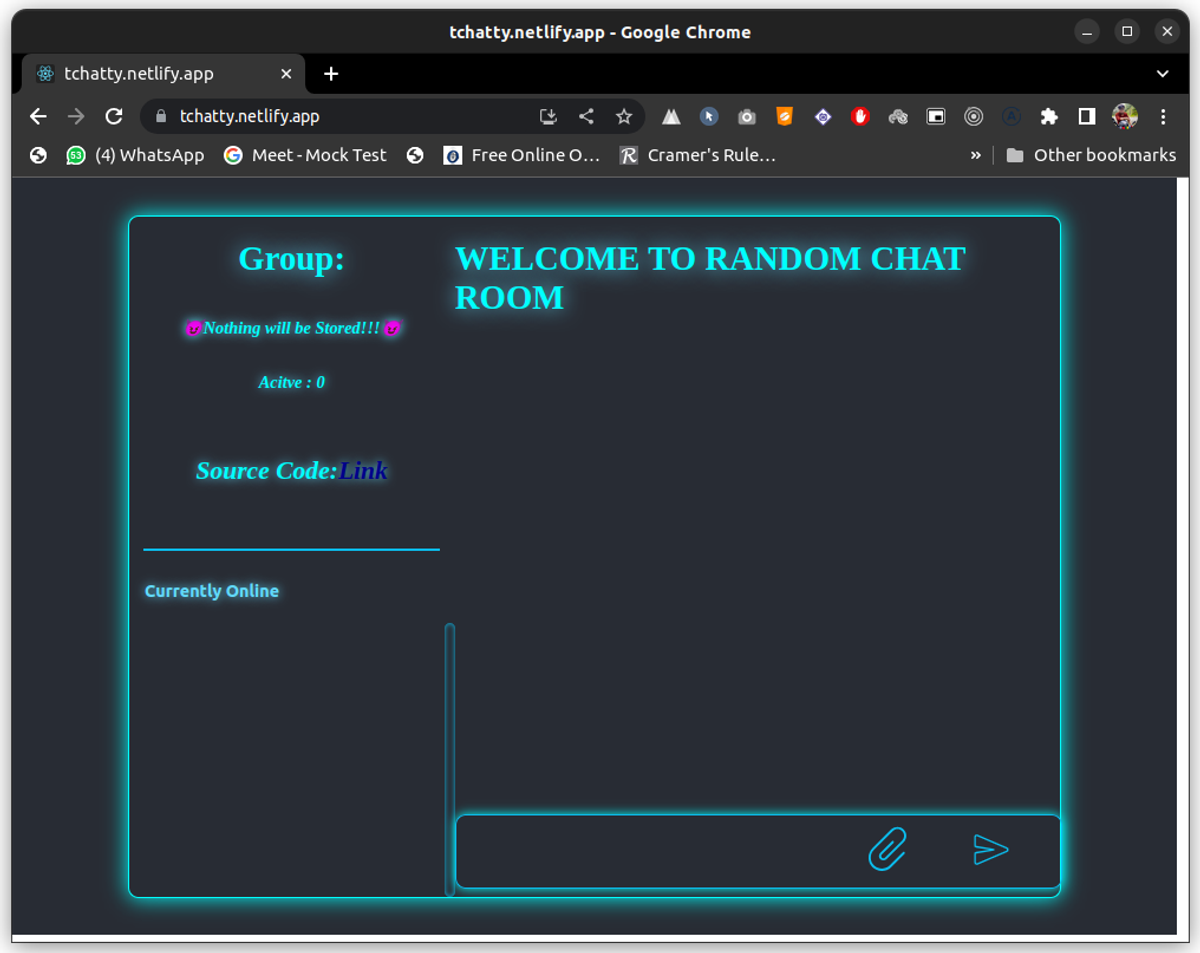
Now have successfully created Our Chat Page and handled the joined user
Our Chat Page Will look like thiis
Now handling the message Part
- Sending the message from client Side
Update the sendMessage Function
  const sendMessage = async()=>{
   if( message!=="") {
      e.preventDefault();
      const messageData = {
        room: room,
        username: username,
        message: message,
        id: socket.id,
        time:
          new Date(Date.now()).getHours() +
          ":" +
          new Date(Date.now()).getMinutes(),
        st: "message",
      };
      await socket.emit("send_message", messageData);
      // setUserList((list)=>[...list,messageData]);

      setMessage("");
      e.preventDefault();


    }
  }
Lets handle send_message event in server side
Goto server.js and add the following code
socket.on("send_message",(data)=>{
  //we are receiving the message and again sending back to the specific room
    io.to(data.room).emit("receive_message",data);
})
Now lets handle the received message on Frontend
useEffect(() => {
  //basically we are storing all the data in userlist i.e username message socketid and soon(Just adding the message to previous list)
    socket.on("receive_message", (data, e) => {
      setUserList((list) => [...list, data]);

    });

    socket.on("roomUsers", ({ users, room }) => {
      const data = {
        users: users,
        room: room,
      };
      setRoomUsers(data);
    });
    socket.on("new_user", (data) => {
      setUserList((list) => [...list, data]);
      const mes = `${data.message}`;
      setJoinedMes(mes);

    });
  }, []);
Congratulation!! You have successfully Created your chat App
For more Info
Github repo: https://github.com/Technicalranjitofficial/Random-chat/tree/main
Building a chat application using Socket.IO, Node.js, and React has provided us with a hands-on experience in harnessing the power of real-time communication.
If you like this blog then share it with your friends.